

Samsung
Samsung 50" Crystal UHD U8000F 4K Smart TV (2025) - (UA50U8000FUXTW)
Samsung 50" Crystal UHD U8000F 4K Smart TV (2025) - (UA50U8000FUXTW)
SKU:UA50U8000FUXTW
Couldn't load pickup availability
- Model number: UA50U8000FUXTW
-
Features
The Best-in-class, crystal clear choice
Key features at a glance
Picture QualityFeel every shade of color as intended in powerful 4K
Crystal Processor 4KSee every shade of color in all its original glory with our advanced processor. Plus, powerful 4K upscaling ensures you get up to a 4K resolution for the content you love.
* Viewing experience may vary according to type of content and format.
** Upscaling may not apply to PC connection and Game Mode.Feel the reality of the world on screen
4K ResolutionMake out the small details in every scene. 4K UHD resolution has 4x more pixels than regular FHD resolution — creating sharp, ultra-realistic images.
More about
Picture QualityEnjoy better contrast with rich darks and bright whites
HDR
High Dynamic Range increases the ratio between the lightest and the darkest regions in a scene, so you can enjoy an enormous spectrum of colors and all the visual details in both bright and dark scenes.
Watch your favorite content in 4K
4K Upscaling
Our powerful 4K upscaling technology ensures you get up to 4K resolution for the content you love.
* Viewing experience may vary according to types of content and format.
** Upscaling may not apply to PC connection and Game Mode.Fine-tuned colors for a vibrant, lifelike picture
PurColor
Watch films so vivid that it feels like you're there. PurColor produces a wide range of colors with optimal quality for an immersive, true-to-life experience.
See images come to life with greater depth
Contrast Enhancer
Contrast Enhancer brings flat images to life by adjusting contrast, resulting in deeper depth for outstanding picture quality.
DesignAn elegant metal design that upgrades your space
MetalStream DesignInspired by aircraft design, this TV features a luxurious metal body. A single sheet of metal is used to create the slim bezel, enabling a truly immersive experience.
One UI TizenPersonalize your screen experience
One UI TizenOne UI Tizen delivers a seamless and consistent Samsung device experience. Our operating system, Samsung Tizen OS, lets you take advantage of the latest innovative Samsung features — including quick access to the content you love, convenient AI management and powerful protection with Samsung Knox Security. Plus, One UI Tizen will support Tizen OS upgrades for next seven years, bringing you the latest apps & services.
Enjoy 7 years of
new TV experiences
for free* Content and services may vary by region and are subject to change without notice.
** Agreement to Smart Hub Terms and Conditions and Privacy Policy is required before use.
*** Some content and services require registration and subscription.
**** Requires Samsung account.
***** Tizen OS upgrades will be supported for up to 7 years starting from 2025, for products released in the year 2025.
****** Please note that the upgrade does not cover hardware-related performance, features or durability.Your privacy. Secured.
Samsung Knox SecurityYour privacy is secure on Samsung TVs. Sensitive data like passwords are protected, connected IoT devices are monitored and malicious apps and sites are automatically blocked. Plus, Samsung's security team helps keep your TV safe with constant updates.
* Samsung Knox Security applies to Samsung TVs powered by Tizen®, launched since 2015.
** Latest software update is required.
Gaming ExperienceImproved picture clarity with smooth motion
Motion Xcelerator
Experience a clear picture as your TV estimates the movement between frames, then uses that information to improve motion smoothness for subsequent frames.
Smart ExperienceConnect and manage your smart home devices, from your TV
SmartThings
With a built-in smart hub, your TV can connect and control smart devices — even those requiring Matter and HCA compatibility. You can also get notifications about your devices straight from the screen, including a 3D Map View that shows your entire smart home system at a glance.
* Available technology, functions and features may vary by country, service provider, network environment or product, and are subject to change without notice.
** Requires a Wi-Fi, Bluetooth or other wireless network connection and login to Samsung account.
*** Connected devices are sold separately.
**** Use of calm technology requires agreement to privacy notices from both SmartThings and the auto-registered device.
***** TV and mobile device must be connected to SmartThings to use 3D Map View function. For a detailed list of supported devices, visit https://partners.smartthings.com/supported-devices.
****** UI is subject to change without prior notice.More about
SmartThingsThe home screen for Samsung Daily+ shows apps and services. The screen scrolls down to highlight the Most Used smart devices. Screen scrolls up and shows the category switching from Featured to Health. Scrolls back down to show the Workout Tracker options. The Galaxy Watch 6 option is highlighted.
Elevate your day with curated lifestyle experiences
Samsung Daily+
Find apps and services for health, work and lifestyle on Samsung Daily+. You can access SmartThings, Workout Tracker, karaoke and more, all in one place.
* Samsung is not responsible for any third-party services, and is not liable for any damages or losses caused by any third-party services.Control your TV from your phone
Quick Remote
Through your mobile device, you can access key Samsung Tizen TV features such as media, features, ambient mode and menu. Quick Remote can also act as your TV remote, allowing you to change channels, adjust the volume and more right from your phone.
* Push notifications for mobile remotes for TVs are available on (Mobile) Android OS 10.0 and higher versions with (TV) 2020 Samsung TVs and later models, and operates when the mobile device is near the TV.
** Samsung Smart TV feature access is available on (TV) 2024 Samsung TVs and later models with (Mobile) Android OS 10.0 and higher versions or iOS 15.0 and higher versions.Easily multitask across screens
Multi Control
Use your mouse to move content across screens, or a single keyboard to type on multiple devices. Your TV can connect with smart monitors and Galaxy devices into a unified experience — controlled by the same mouse, touchpad or keyboard. Thanks to Samsung's seamless ecosystem, you can easily stay connected and redefine your everyday life.
* Each device must be registered with a single Samsung account and be connected to the same Wi-Fi network.
** Multi Control requires updated Galaxy phones and tablets with One UI 5.1.1 or above, and Galaxy Book series devices released in 2021 or later with Samsung Settings v1.5 (Intel) or Samsung Settings v3.3 (ARM), and TVs and smart monitors from 2024 or later.
*** Some functions (such as Copy & Paste or Drag & Drop) may not be available when using certain device models and apps.
**** Feature availability may vary by region.Gesture to control with your watch
Universal Gestures
Easily control your TV with your smartwatch. Just wear your Galaxy Watch and use hand gestures, like pinching to select an option, or moving your wrist back and forth for pause and play.
* Available apps and services may vary and are subject to change without notice.
** Only supported on Samsung Galaxy Watch 4 and later models, with Wear OS 5 and higher versions.Take your home workout sessions to another level
Workout Tracker
Track real-time exercise data while watching your favorite shows. Your TV can display feedback from your exercise devices and play content on a single screen during your home workout sessions.
* Available from March 2024. Supported devices are Galaxy Watch 4 ↑with Galaxy Mobile (One UI 4.1.1 and above) with latest software version. Devices must be logged into the same Samsung account.
SoundTV and soundbar play together in smooth harmony
Q-Symphony
Surround yourself with beautifully orchestrated sound. Samsung technology syncs the TV and soundbar audio to play simultaneously — without muting the speakers of either device.
A TV shows a concert scene. When Q-Symphony is off, the soundbar under the TV plays audio by itself, giving off small sound waves. When Q-Symphony is on, the TV and soundbar play audio together, with both giving off large sound waves in sync.* Check for Q-Symphony compatibility on soundbar product specifications.
** Soundbar sold separately.
*** The location and number of speakers may vary depending on the model.Immersive virtual sound that tracks the action
OTS Lite
3D surround sound with our virtual top channel audio allows you to be immersed in the audio experience.
A TV depicts a scene of a train passing by a scenic outdoor location. As it does, sound waves appear near where the train touches the tracks, indicating the noise within the scene.Enjoy sound optimized to your content
Adaptive Sound
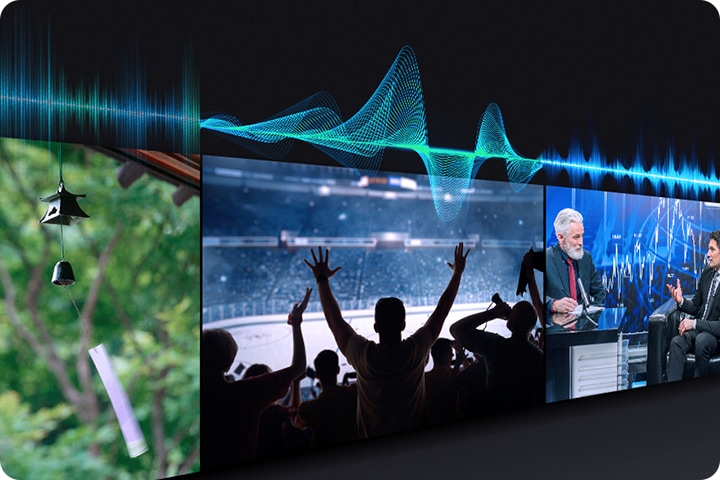
Adaptive Sound has audio scenic intelligence that optimizes sound based on real-time scene analysis by content type.
SustainabilitySave energy with intelligent analysis
AI Energy Mode
Easily reduce your power consumption by turning on AI Energy Mode. Your TV will auto-adjust its brightness based on the room's lighting and your user activity. It also subtly adjusts brightness during different scenes to save even more energy.







Shipping & Returns
Shipping & Returns
The delivery will be within 2 business days unless it is mentioned otherwise.